Your best work should not be buried on a single page of your website.
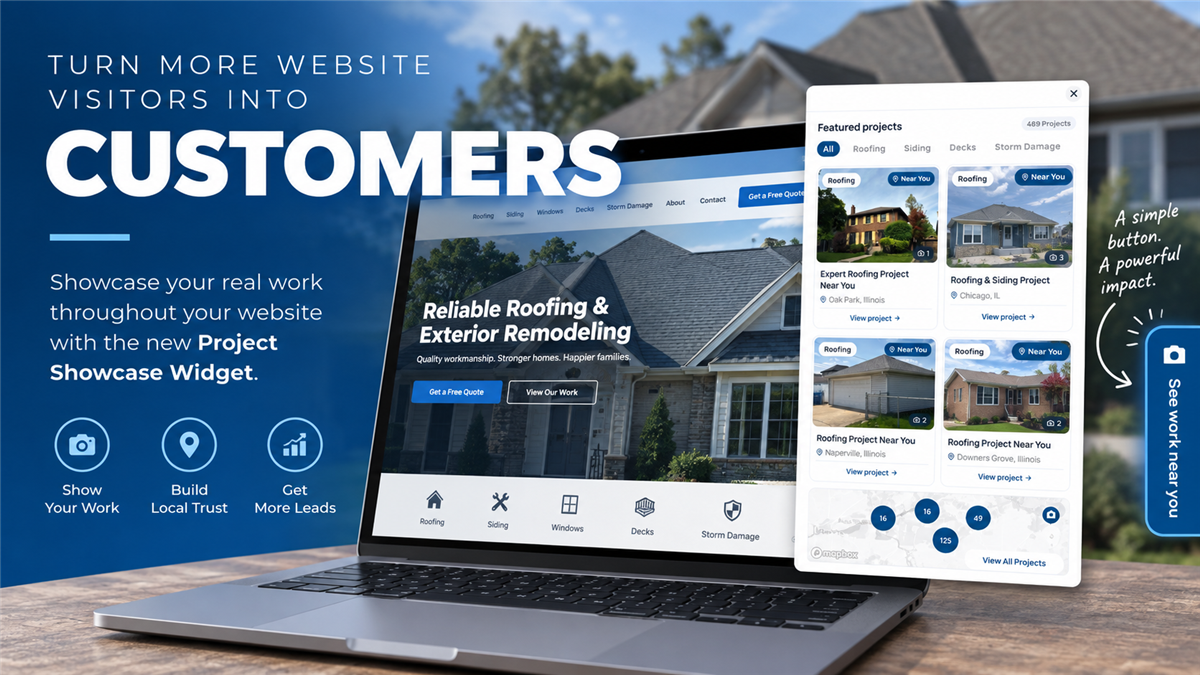
Homeowners want to see proof before they take the next step with a contractor. They want to know what you have done, where you have worked and whether you have completed projects like theirs.
Project Showcase already helps Predictive Sales AI customers turn completed jobs into individual, highly visual project pages that highlight real work in real neighborhoods.
Now, with the new Project Showcase Website Widget, you can put that proof in front of homeowners throughout your website—without asking them to go looking for it.
The new widget creates a customizable floating button on your website that gives visitors instant access to your featured projects, an interactive project map and individual Project Showcase pages.
Your Projects, Available From Anywhere on Your Website
Think about how most homeowners actually navigate a contractor's website.
One visitor might land on your homepage. Another comes through a roofing service page. Someone else finds a local service-area page through Google.
Previously, those visitors had to intentionally navigate to your past projects to discover the work you have completed.
The Project Showcase Widget changes that.
Once installed, a customizable button can remain visible along the side of your website as visitors browse. A simple message such as "See work near you" gives homeowners an opportunity to explore relevant projects without leaving the page they're currently viewing.
Clicking the widget opens the full Project Showcase experience directly over the website.
Visitors can:
Browse featured projects and project photos.
Explore projects by service or project type.
See completed work geographically on an interactive map.
Search by address, neighborhood or ZIP code.
Discover projects completed near them.
Open individual Project Showcase pages for more information.
Instead of simply telling homeowners that you serve their community, you can show them the work you've already completed there.
Turn Every Page Into an Opportunity to Build Trust
A homeowner reading about your roofing services shouldn't have to hunt through your navigation to find examples of your roofing work.
A visitor researching siding shouldn't have to wonder whether you've completed siding projects nearby.
Your project history is one of the strongest forms of credibility your company has. The Website Widget makes that proof accessible throughout the buying journey.
A visitor can go from researching a service to seeing a completed project near their neighborhood in just a few clicks.
That creates a much stronger connection than a generic project gallery.
They're not simply seeing a roof you installed.
They're seeing a roof you installed near them.
Make Project Showcase a Bigger Part of Your Website
The Website Widget is designed to complement your existing Project Showcase rather than replace it.
Each completed project can still have its own dedicated page with photos, project information, location context and other details about the work performed.
The widget simply creates another entry point into that content.
That means the work your team is already doing to document and publish projects can now have significantly more visibility across your website.
As your Project Showcase grows, the widget becomes increasingly valuable—giving homeowners an expanding library of real-world examples they can explore.
Customize the Widget to Match Your Website
The widget is designed to feel like part of your website rather than an intrusive third-party add-on.
From the Projects section of the Predictive Sales AI platform, select Project Widget to configure the experience.
You can customize the button text, choose the button color and determine which side of the screen the widget appears on.
For example, your CTA might say:
See work near you
Explore our projects
See projects near you
View our recent work
Once your design is configured, the Connect section provides the script needed to add the widget to your website.
You can choose where that script is installed based on how prominently you want Project Showcase featured—including deploying it throughout your website.
From Completed Project to Your Next Opportunity
Project Showcase was built around a simple idea: the work you've already completed should help generate the work you haven't won yet.
Every completed project gives you another piece of authentic content tied to a real service and a real market.
The new Website Widget makes it easier to put that content in front of prospective customers at the exact moment they're evaluating your company.
Instead of keeping your project history tucked away in a gallery, you can turn it into an interactive layer of your website—one that helps homeowners discover your work, validate your local experience and move naturally toward contacting your business.
Put Your Best Work Front and Center
The Project Showcase Website Widget is now available in Predictive Sales AI.
Head to Projects → Project Widget in your platform to customize your widget, grab the installation script and start featuring your projects throughout your website.
Your projects already tell the story of what your company can do. Now make sure more homeowners see them.
Turn More Website Visitors Into Customers With the New Project Showcase Widget

Exterior Source & Bath Source: Building a Stronger Digital Foundation for Sustainable Growth

Extreme Weather Insights: Severe Weather Winds Down September 14–20

Stop Hoping for Referrals: Build a Referral Marketing System
Subscribe to Predictive Sales AI, LLC's Blog

Comments